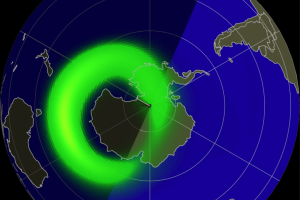
Please find the Aurora probability for Australia & New Zealand below:
Last Updated: 18:00 AEST, 01/10/2024. For the latest Aurora Oval, please visit https://www.swpc.noaa.gov/products/aurora-30-minute-forecast . For latest updates and photos, please visit Aurora Australis Facebook Group.
Australia’s Tasmania, with its unique combination of southern latitude and relatively low light pollution, stands out as the state with the highest probability of witnessing the Aurora Australis or Southern Lights. Spots like Mount Wellington and Cockle Creek, with their unobstructed views and minimal light interference, offer exceptional opportunities for aurora viewing.
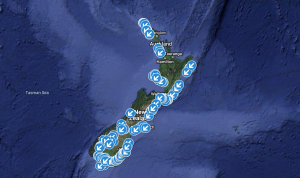
In New Zealand, the South Island is a privileged destination for witnessing the aurora, especially in regions like Otago and Southland. Exclusive locations like Stewart Island, Lake Tekapo, and Dunedin, with their southern location and clear, dark skies, offer a rare chance to witness this celestial spectacle.
Aurora Viewing Locations
New Zealand, Tasmania, Victoria, South Australia, Western Australia, Australian Capital Territory, New South Wales
Latest WSA-ENLIL Solar Wind Prediction

NOAA Kp index breakdown (UTC)

AEST is 10 hours ahead of UTC. So, when it is 11:00 am UTC it will be 9:00 pm AEST. The New Zealand Standard Time (NZST) is 13 hours ahead of Coordinated Universal Time (UTC). So, when it is 10:00 am UTC it will be 11:00 pm NZST.
No G1 (Minor) or greater geomagnetic storms are expected. No significant transient or recurrent solar wind features are forecast.
Chasing Aurora Australis Book
Chasing Aurora Australis: Over 1000 locations to view the Southern Lights!
Can I see Aurora tonight?
This is one of the most commonly asked questions. So, I ended up creating a flowchart. I hope this helps. I have assumed you are in a location with a clear view of the South away from light pollution and the Moon is not too bright. And feeling lucky = hoping for gaps in clouds (at least low and middle level clouds).

Aurora Apps & Websites
SpaceWeatherLive – Android / iOS . Website: https://www.spaceweatherlive.com/
How to Capture Aurora Australis With Your iPhone
Enable Night Mode: Night Mode kicks in automatically in low light, letting your camera capture more detail with longer exposure. Look for the moon icon. Maximize exposure time for the best Southern Lights shots. Available on iPhones since the iPhone 11.
Use a Tripod: For sharp photos, mount your iPhone on a tripod. Even tiny movements can blur your shot. No tripod? Use a stable surface. You can trigger the camera remotely with an Apple Watch.
Choose the 1x Lens: The 1x wide-angle lens works best for low-light photography, giving you the brightest, clearest images.
Manually Focus: Tap to focus on your subject, whether it’s the sky or a foreground object. For sky shots, your iPhone will focus to infinity.
Adjust Shutter Speed: If the Southern Lights are faint, increase the shutter speed in Night Mode.
Shoot in RAW: Enable RAW in Settings for better post-processing control. Go to Settings > Camera > Formats > Apple ProRAW.
How to Capture Aurora Australis On Android Phone
Tripod and Phone Holder: Use a light, compact tripod with a screw-tightening phone holder for stability. If using a spring-loaded holder, secure it with an elastic band to prevent your phone from falling.
Focus for Clarity: Tap to focus on a distant point, like a star, ensuring your photo is sharp and clear.
Use Your Primary Lens: Stick to your primary lens for the best photo quality. Avoid using a super-wide lens, as it’s not as good in low-light conditions.
Shoot in RAW: Enable RAW mode for more editing flexibility later.
Enable Night Mode: Switch to night mode and set ISO to 1600+ with a white balance around 3200K for natural-looking photos.
Adjust Shutter Speed: In ‘Manual’ Mode, set the shutter speed to 1-5 seconds for bright lights and 20-30 seconds for dimmer ones. Turn off the flash.
Rotate Your Device: Capture a wider scene by turning your device horizontally.
How to Capture Aurora Australis With Samsung Galaxy Expert RAW
Expert RAW is a top-notch camera app for Samsung Galaxy phones, available for models S20 and later. It lets you capture high-quality HDR photos and provides both JPEG and RAW (16-bit Linear DNG) files for detailed editing. The app offers manual control over ISO, shutter speed, white balance, exposure, and focus, and includes special features for astrophotography and multiple exposures. Download it from the Galaxy Store.
How to Use Expert RAW:
* Open the Expert RAW app.
* Tap the settings icon.
* Enable “Special photo options” / Expert RAW Labs.
* Select Astrophotography mode, then adjust focus, white balance, and exposure time to capture the night sky.
Recommended Settings:
Shutter Speed: Start at 10 seconds and adjust based on the Aurora’s intensity.
ISO: Begin at 800, adjust as needed.
White Balance: Set to 3900K.
Focus: Center.
Other Settings: Keep on auto.
File Type: RAW